Bunu telefonda mı okuyorsunuz?
Tarayıcı uzantıları telefonlarda çalışmaz. iPhone, iPad ve Android'de YouTube'da çift altyazı, ücretsiz Linglass uygulamasında çalışır.
Kore dizileriyle Korece öğreniyorsanız, aslında istediğiniz belirli bir düzen var: ekranda oyuncuların söyledikleriyle eşleşen Korece altyazılar ve hemen altında, henüz bilmediğiniz kelimeler için bir Türkçe satır. Cümleyi duyun, Hangul'da okuyun, anlamına bakın — tek bir bakışta, durdurmadan.
Hiçbir yayın platformu bunu sunmuyor. Netflix tek bir altyazı gösterir. Viki tek bir altyazı gösterir. YouTube da öyle. Herhangi bir Korece öğrenme forumunda arama yapın; yıllardır sorulan aynı soruyu bulursunuz — genelde «yapılamaz» diye yanıtlanan ya da bir altyazı-dosyası sitesine ve koca bir senkronizasyon talimatı sayfasına yönlendiren.
Oysa yapabilirsiniz — üstelik dosya avına çıkmadan. Bu rehber, Korece ve Türkçe altyazıyı aynı anda ekrana koyan ücretsiz düzeni, nerede işe yaradığını ve bir dizide en baştan Korece altyazı — ya da Türkçe altyazı — olmadığında ne yapacağınızı anlatıyor.
Kore dizileri için çift altyazıyı edinin — ücretsiz →
Kore dizilerini aynı anda iki altyazı diliyle izleyebilir misiniz?
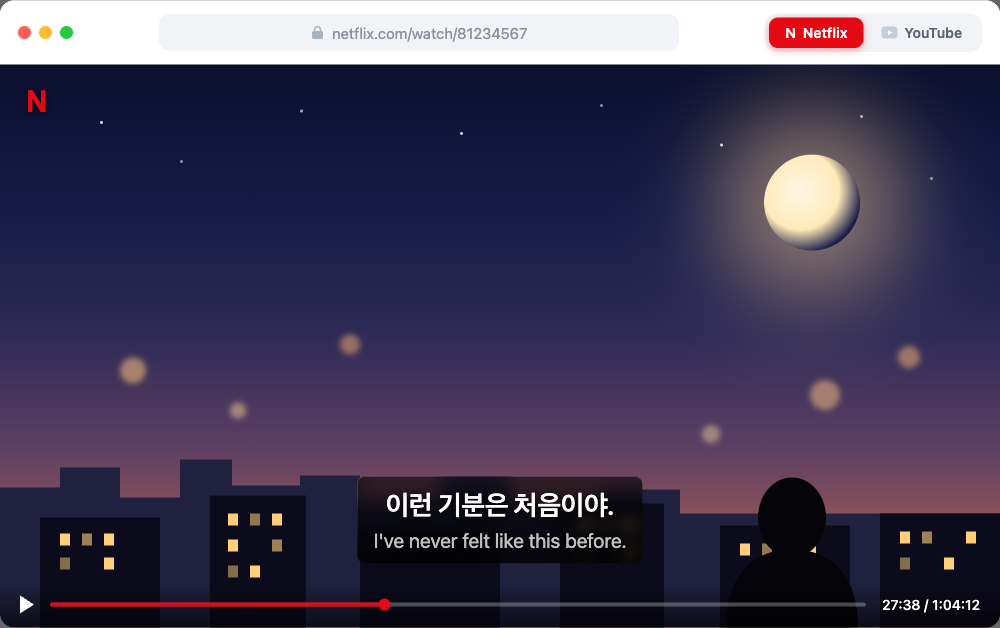
Doğrudan hayır — hiçbir yayın oynatıcısı iki altyazıyı bir arada göstermez. Bunu yapmanın yolu bir tarayıcı eklentisi: Korece altyazıları olduğu gibi bırakır ve hemen altına çevrilmiş ikinci bir satır çizer. Linglass bunu Netflix, YouTube ve Viki'de, herhangi bir Chromium tarayıcısında (Chrome, Edge, Brave, Opera) ücretsiz yapar ve tam da bu kullanım için tasarlandı — ikinci satır sadece kolaylık için değil, öğrenmek için orada; bu yüzden Korece satırdaki her kelimeye, okunuşu ve anlamı için tıklanabilir.
İki de olmadığı şey var: Netflix veya YouTube'un yerleşik çevirisi değildir — o çeviri Korece satırı bir makine çevirisiyle değiştirir, yani ikisini birden asla göremezsiniz; ve indirip bulmanız, bölümünüzle eşleştirmeniz ve her kaydığında yeniden senkronlamanız gereken bir .srt dosyası da değildir. Zaten kullandığınız yayın sitesinde, zaten izlemekte olduğunuz şeyin üzerinde çalışır.
İki satırı neden istersiniz
Bir Kore dizisini yalnızca Türkçe altyazıyla izlemek eğlencedir — beyniniz Türkçeyi okur ve Koreceyi geri plana atar. Diziyi bitirdiğinizde Korecede başladığınız yerden bir adım ileride olmazsınız. Yalnızca Korece altyazıyla izlemek işe yarar, ama her bilinmeyen kelime durdurmak, Hangul'u sözlüğe kopyalamak, sahneyi kaçırmak demektir — üstelik Korecenin ekleri ve fiil çekimleri, başlarda bağlamdan tahmin etmeyi zorlaştırır.
Çift altyazı, bir diziyi öğrenilebilir kılan orta yoldur: Korece satır duyduğunuz sesleri ekrandaki kelimelere bağlar, Türkçe satır ise yalnızca takıldığınızda göz attığınız bir güvenlik ağıdır. Daha eksiksiz bir yöntem istiyorsanız — aralıklı ilerleme, hangi dizinin hangi seviyede izlenebileceği, cümlelerin nasıl çıkarılacağı — bu yazı düzenin kendisiyle ilgili; buradan başlayın, gerisi arkasından gelir.
Netflix: en büyük yasal Kore dizisi kataloğu
İnsanlar «Kore dizisi» derken kastettikleri dizilerin çoğu Netflix'te var ve Linglass ikinci altyazı satırını hepsinde aynı şekilde ekler: bir bölüm açın; eklenti Türkçe çeviriyi Korece altyazıların altına sabitler — replik replik eşleştirilmiş, böylece iki satır birbirinden hiç kaymaz.
Kurulum iki dakika sürer:
- Linglass'i Chrome Web Mağazası üzerinden yükleyin.
- Ayarlarında öğrendiğiniz dil olarak Koreceyi, çeviri olarak Türkçeyi (ya da ana dilinizi) seçin.
- Herhangi bir diziyi açın — iki satır oynatıcıda birlikte görünür.
Bir kez ayarladıktan sonra her bölüme uygulanır. Dizi başına ayar gerekmez.
Kontrol edilecek bir şey var: dizinin bölgenizde bir Korece altyazı içerip içermediği. Netflix'in kendi Kore yapımlarında neredeyse her zaman vardır; bazı lisanslı diziler yalnızca dublajlı bir ses ile yerel altyazınızı sunar. Dizi sayfasında Ses ve Altyazılar'ı açın — Korece listeleniyorsa, diziyi ilk açtığınızda Netflix'in kendi menüsünden bir kez etkinleştirin. Netflix yalnızca etkin saydığı altyazıyı yükler; bu da Korece satırı eklentiye hemen sunar.
YouTube: eğlence programları, klipler ve vloglar
YouTube'da çoğu öğrencinin yararlandığından çok daha fazla Korece var: KBS World ve SBS gibi resmi kanallar altyazılı eğlence programları ve dizi kesitleri yayınlar; bunların ötesinde röportajlar, idol içerikleri, gündelik vloglar ve doğal hızda konuşan Koreli içerik üreticileri var. Senaryo dışında günlük konuşma Korecesini duymanın en iyi yeri burası.
Kurulum aynı — yükleyin, Korece → Türkçe olarak ayarlayın, Korece altyazılı bir video açın; iki satır da görünür. YouTube'un size çıkardığı iki ek durum var:
- Kaba otomatik altyazılar. YouTube'un otomatik oluşturduğu Korece, garip bölünmelerle akıp giden bir metin olarak gelir. Linglass bunu çevirmeden önce okunabilir satırlara yeniden böler; böylece otomatik altyazılı videolar bile izlenebilir olur.
- Hiç altyazı yok — vloglarda, eski yüklemelerde ve küçük kanallarda yaygındır. Bir sonraki bölüme bakın.
Bir dizide Korece altyazı — ya da Türkçe altyazı — yoksa ne olur?
Çoğu araç tam burada durur ve bu, arama sonuçlarını dolduran şikâyetin ta kendisidir: «Netflix'te bu Kore dizisinin Türkçe altyazısı yok», «bir diziye Korece altyazıyı nereden bulacağım ki?» İki ayrı boşluk var ve Linglass ikisini de halleder:
- Korece altyazı yok (bir YouTube vlogu, bir klip, eski bir yükleme): Linglass onları oluşturur. Korece sesi temiz, okunabilir altyazı satırlarına döker ve çeviriyi altında gösterir — böylece altyazısız içerik de çalışma materyaline dönüşür.
- Korece altyazı var, ama dilinize çeviri yok (Korece altyazı sunan ama Türkçe sunmayan bölgesel bir Netflix dizisi): Linglass Korece satırın kendisini çevirir ve ikinci satır olarak gösterir; böylece yine ikisi de elinizde olur — üstte Korece, altta sizin diliniz.
Kimsenin çözemeyeceği tek durum: Korece altyazısı hiç olmayan ve Korecenin yalnızca seste bulunduğu, üstelik transkripsiyonu engelleyen bir platformdaki bir dizi. Orada mesele teknik değil, lisans boşluğudur — ve aynı dizi çoğu zaman YouTube'da klip hâlinde bulunur, orada da yukarıdaki transkripsiyon yolu her hâlükârda işler.
Kore dışında Kore dizilerindeki altyazı seçeneklerinin neredeyse tamamı, Korece bilmeyen izleyiciler için yapılmış çevirilerdir; bu yüzden gerçek bir Korece altyazı, menülerin düşündürdüğünden daha nadirdir. Hangi servislerde gerçekten bulunduğunu — Netflix, YouTube, Viki ve Kore platformları — Korece altyazılı Kore dizileri: gerçekte nerede bulunur? yazısında anlattık.
Peki Viki, Viu ve Kocowa?
Viki, Viu ve Kocowa, özellikle Netflix kataloğunun dışında pek çok Kore dizisi hayranının izlediği yerlerdir. Türkiye'de Kore dizilerini çoğunlukla Netflix ve Viki taşır (BluTV'de de bir miktar bulunur). Neyin nerede işe yaradığı şöyle: Linglass çift altyazıyı Netflix, YouTube ve Viki'de ekler; Viu, Kocowa ve BluTV desteklenmiyor. Viki'nin kendi «Learn Mode»u ise artık bir seçenek değil — Rakuten onu 31 Temmuz 2023'te kaldırdı ve geri getirmedi.
Ama Viki'ye özgü bir çekince var ve bir dizinin çalışmaya elverişli olup olmadığını asıl o belirliyor. Viki'nin altyazılarını, konuşulan dilden dışarı doğru çeviren gönüllüler yazıyor; dolayısıyla Korece iz — tam da istediğiniz iz — kimsenin yazmaya ihtiyaç duymadığı iz oluyor. Viki'de öne çıkan 20 yapımdan yalnızca yarısında ekranda konuşulan dilde herhangi bir iz vardı ve bunlar da yeni başlamıştan tamamlanmışa kadar değişiyordu. Netflix profesyonel Korece altyazıyı çok daha tutarlı biçimde sunuyor. 16 bölümlük bir diziye başlamadan önce bir izin tamamlanma yüzdesini nasıl kontrol edeceğiniz dahil olmak üzere tablonun tamamı Viki'de çift altyazı yazısında.
Korece satırı okumak: dokununca okunuş ve anlam
Çift altyazı iki dili ekrana getirir; bir diziyi kelime dağarcığına çeviren şey ise okuma yardımlarıdır. Korece satırda herhangi bir kelimeye dokunun; Linglass sahneyi durdurmadan onun okunuşunu ve anlamını gösterir — Hangul'u ayrı bir sözlüğe kopyalamak, yerinizi kaybetmek yok. Aklınızda tutmak istediğiniz kelimeler tek dokunuşla kaydedilenler listesine gider, oradan da aralıklı tekrara; böylece bir dizinin öğrettiği kelimeler akıp gitmek yerine gerçekten kalıcı olur.
Genel altyazı araçlarının atladığı kısım tam da budur. Ekranda iki satır olması kolay olan yarısıdır; asıl saatleri değerli kılan, henüz duyduğunuz Korece kelime üzerinde bir şey yapabilmektir — onu okumak, anlamak, kaydetmek.
İki altyazı satırıyla izlemek bir koltuk değneği değil mi?
Haklı bir endişe — ve yalnızca Türkçeyi okuyup Koreceyi görmezden gelirseniz doğrudur. Doğru sırayla kullanıldığında çift altyazı bir koltuk değneğinin tam tersini yapar: önce dinleyin, sesi yazımla bağlamak için Korece satırı okuyun ve yalnızca bir kelime sizi tıkadığında Türkçeye inin. Çeviri, ilk aylarda yalnızca Korece altyazıyı yorucu kılan durup sözlük karıştırmayı ortadan kaldırır — bu sürtünme, çoğu öğrencinin, girdi henüz birikmeden bırakmasına yol açan şeydir.
Ve yavaş yavaş bırakabilirsiniz: kendinizi sınamak için Türkçe satırı istediğinizde gizleyin, bir sahne yoğunlaştığında tekrar açın. Amaç iki satıra sonsuza dek yaslanmak değil — kulağınız yetişirken izlemenin keyifli kalmasına yetecek kadar Koreceyi, yeterince erken anlamaktır.
Sıkça sorulan sorular
Kore dizilerini aynı anda Korece ve Türkçe altyazıyla izleyebilir misiniz?
Evet, ücretsiz bir tarayıcı eklentisiyle. Yayın oynatıcıları yalnızca tek bir altyazı gösterir; bu yüzden Linglass gibi bir eklenti Korece altyazıları olduğu gibi bırakır ve altlarına çevrilmiş bir satır ekler. Chrome, Edge ve diğer Chromium tarayıcılarında Netflix, YouTube ve Viki'de çalışır.
Netflix'te Korece ve Türkçe altyazıyı birlikte nasıl açarım?
Linglass'i yükleyin, öğrendiğiniz dil olarak Korece'yi, çeviri olarak Türkçe'yi seçin ve diziyi açın. Dizi, Ses ve Altyazılar bölümünde Korece'yi listeliyorsa, o altyazıyı Netflix'in kendi menüsünden bir kez etkinleştirin — eklenti bundan sonra her bölümde birbiriyle eşleştirilmiş iki satırı gösterir.
Bir Kore dizisine Korece altyazıyı nereden bulabilirim?
Altyazı dosyalarının peşine düşmenize gerek yok. Dizinin Netflix veya YouTube'da Korece bir altyazısı varsa, Linglass onu doğrudan kullanır ve çeviriyi ekler. Bir YouTube videosunda hiç altyazı yoksa, Linglass Korece sesi kendisi altyazı satırlarına döker — böylece yayınlanmış bir altyazı olmadığında bile bir Korece satır elde edersiniz.
Netflix'te bir Kore dizisinin Türkçe altyazısı yoksa ne olur?
Linglass Korece satırın kendisini çevirir ve ikinci satır olarak gösterir; böylece yine ikisi de elinizde olur — üstte Korece, altta Türkçe (ya da sizin diliniz). Bu, Korece altyazı sunan ama Türkçe çeviri sunmayan bölgesel dizileri kapsar.
Çift altyazı Korece öğrenmeyi yavaşlatır mı?
Yalnızca Korece yerine çeviriyi okursanız. Doğru kullanıldığında — önce dinleyin, Korece satırı okuyun, yalnızca takıldığınızda Türkçeye göz atın — ikinci satır, öğrenciler için yalnızca Korece altyazıyı yorucu kılan durup sözlüğe bakmayı ortadan kaldırır. Kendinizi sınamak için onu istediğiniz zaman gizleyebilirsiniz.
Kore dizileri için telefonumda çift altyazı kullanabilir miyim?
Tarayıcı eklentileri yalnızca masaüstü tarayıcılarında çalışır, yani Netflix veya YouTube'un mobil uygulamalarında çalışmaz. YouTube için Linglass uygulaması aynı düzeni iPhone, iPad ve Android'e getirir — çift altyazı, dokun-çevir ve tekrar kartları tek bir oynatıcıda.
Kısa özet
- Hiçbir yayın oynatıcısı aynı anda iki altyazı göstermez — Netflix, Viki ve YouTube hepsi tek satır gösterir. Ücretsiz bir tarayıcı eklentisi ikinci satırı ekler.
- Linglass Netflix, YouTube ve Viki'de çalışır — Chrome, Edge, Brave ve Opera'da: öğrendiğiniz dil olarak Korece'yi, çeviri olarak Türkçe'yi (ya da ana dilinizi) seçin.
- Netflix'te Korece altyazıyı yerel menüden bir kez etkinleştirin ki eklenti onu çeviriyle eşleştirebilsin.
- Bir dizide Korece altyazı yoksa Linglass sesi transkribe eder; Korece var ama Türkçe yoksa Korece satırın kendisini çevirir — böylece her iki durumda da iki satırı elde edersiniz.
- Herhangi bir Korece kelimeye dokunun; okunuşunu ve anlamını görün, aralıklı tekrara kaydedin — izlemeyi kelime dağarcığına çeviren şey budur.
Kore dizilerini Korece + Türkçe altyazıyla izleyin
Netflix, YouTube ve Viki için ücretsiz eklenti: çift altyazı, dokununca okunuş, tek dokunuşla tekrar kartları — ve bir dizide altyazı olmadığında altyazı da oluşturabilir.
App Store