Reading this on your phone?
Browser extensions can't run on phones. On iPhone, iPad and Android, dual subtitles on YouTube work in the free Linglass app.
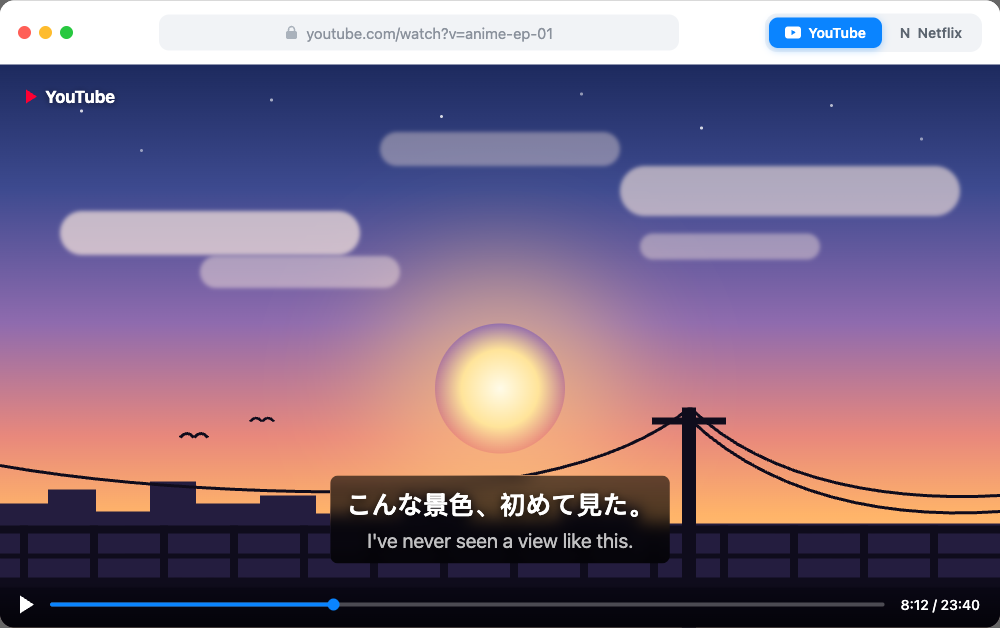
If you're learning Japanese with anime, there's a specific setup you want: the Japanese subtitles on screen, matched to what the characters are saying, with an English line right underneath for the words you don't know yet. Hear the line, read it in Japanese, check the meaning — one glance, no pausing.
No streaming platform offers this. Netflix shows one subtitle track. Crunchyroll shows one subtitle track — and offers no Japanese subtitle track at all. YouTube shows one track too. Search any anime forum and you'll find the same question asked for years, usually answered with "you can't."
You can. This guide covers the free setup that puts Japanese and English subtitles on screen at the same time, where it works, and what to do when an anime clip has no Japanese captions to begin with.
Get dual subtitles for anime — free →
Can you watch anime with two subtitle languages at once?
Not natively — no platform's player can render two subtitle tracks together. The way to do it is a browser extension: it keeps the Japanese subtitles and draws a second, translated line right below them. Linglass does this for free on YouTube, Netflix and Crunchyroll in any Chromium browser (Chrome, Edge, Brave, Opera), and it was built for exactly this use case — the second line is there for learning, not just convenience, so every word on the Japanese line is clickable for its reading and meaning.
Two things it is not: it's not YouTube's auto-translate, which replaces the Japanese line with a machine translation so you never see both; and it's not fansub-style hardcoded dual subs you have to hunt down as video files. It works on the streaming site you already use, on whatever you're already watching.
Why you want both lines
Watching anime with English subtitles only is entertainment — your brain reads English and tunes the Japanese out. Watching with Japanese subtitles only works, but every unknown word means pausing, retyping kanji into a dictionary, losing the scene.
Dual subtitles are the middle path that makes anime learnable: the Japanese line connects the sounds you hear to the words on screen, and the English line is a safety net you glance at only when you're stuck. If you want the full method — and which shows are actually watchable at your level — we've graded ten beginner-friendly series in our guide to learning Japanese with anime. This article is about the setup itself.
YouTube: the easiest place to start
There's more anime on YouTube than most people expect: official channels like Muse Asia and Ani-One stream full episodes in many regions, and beyond that there are openings, scene cuts, seiyuu interviews, anime podcasts and Japanese creators talking about the shows you watch.
When you want Japanese beyond anime, our directory of scored Japanese channels grades channels by vocabulary load and speaking pace from their own subtitles — useful for finding something a level below the show that's currently beating you.
The setup takes two minutes:
- Install Linglass from the Chrome Web Store.
- In its settings, set Japanese as the language you're learning and English (or your native language) as the translation.
- Open any video with Japanese captions — both lines render together in the player.
Once set, it applies to every video. No per-video configuration.
When a video only has auto-generated captions: YouTube's auto-captions for Japanese arrive as a run-on stream of text with awkward breaks. Linglass re-segments them into readable lines before translating, so even auto-captioned videos are watchable.
When a video has no captions at all: this is where most tools stop, and it's common for anime clips, older uploads and smaller Japanese channels. Linglass generates the subtitles itself — open the video and it transcribes the Japanese audio into clean subtitle lines, translation underneath. There's a full write-up in our guide to YouTube videos with no subtitles.
Netflix: works when the show carries a Japanese track
Netflix is the best legal catalog for full anime series, and Linglass adds the second subtitle line the same way: open a show, and the extension pins the English translation under the Japanese subtitles — matched cue by cue, so the lines never drift apart.
The one thing to check is whether the title offers Japanese subtitles in your region. Netflix's own anime productions usually carry them worldwide; licensed shows vary by region. Two practical tips:
- Check Audio & Subtitles on the title page. If Japanese subtitles are listed, you're set.
- Turn the Japanese track on once in Netflix's own subtitle menu when you first open the show — Netflix only loads the track it considers active, and this makes it available to the extension immediately.
If a show genuinely has no Japanese subtitle track in your region, no extension can conjure one — that's a licensing gap, not a technical one. The same show is often on YouTube in clip form, where the transcription route above works regardless.
Crunchyroll: now it works too
Crunchyroll's own menu has no Japanese subtitles on any series we checked — its subtitles are translations out of Japanese, made for viewers who don't understand the audio. Linglass now fills that gap on crunchyroll.com: it finds a Japanese subtitle file for the episode you're watching, aligns it to Crunchyroll's own timing, and shows it as the top line, with your language underneath — from Crunchyroll's own track when it has one, machine-translated when it doesn't.
Two honest limits. Popular shows are well covered and niche ones less so, and when a file doesn't match the episode you get a short note instead of a line that drifts against the speech. And the Japanese line follows the Japanese audio, so watch the original rather than a dub. The full picture, including which subtitle languages Crunchyroll has, is in our guide to Crunchyroll subtitles.
Where anime with Japanese subtitles actually exists
Step back from dual subtitles for a moment. Before you can pair a Japanese line with an English one, a Japanese line has to exist at all — and that is the part most guides skip. Here is the honest map, worst to best:
- Crunchyroll — not in its own menu. Its subtitles are built for viewers who don't speak Japanese, so there is no Japanese track to pick. On crunchyroll.com, Linglass adds one from a Japanese subtitle file aligned to the episode — covered above.
- Japanese-region services (U-NEXT, ABEMA, dAnime Store) — yes, if you're in Japan. These carry proper Japanese subtitles because they serve Japanese viewers, including deaf and hard-of-hearing ones. They're geo-locked, and working around that breaks their terms.
- Dedicated learner sites. Most search results for this question point at a site that hosts anime with Japanese subtitles built in. They're convenient, but the library is fixed, it isn't licensed, and shows disappear. Worth knowing they exist; not worth building a routine on.
- Netflix — yes, and legally. Netflix's own anime productions almost always carry Japanese subtitles in every region; licensed series vary. This is the best legal source for full seasons, and the check takes five seconds in Audio & Subtitles.
- YouTube — the widest, and the only one with no gaps. Official channels (Muse Asia, Ani-One and the studios' own uploads) often carry Japanese captions outright. And when a video has none, the audio can be transcribed into a Japanese line directly — which means "no Japanese subtitles for this clip" stops being a dead end. That's the difference between a catalog you have to search and one you can simply use.
One thing worth naming, since no other page does: when a Japanese line is produced from the video's audio, it is a transcription of what is actually being said — not a machine translation of an English track. That distinction matters for a learner. A translated line drifts from the words on the soundtrack; a transcribed one is the soundtrack. It is also why we won't fabricate a Japanese line over Japanese speech from a translation: it would look right and teach you the wrong words.
Reading the Japanese line: furigana on tap
Getting the Japanese subtitles on screen is half the problem. The other half is kanji you can't read yet.
In Linglass, every word in the subtitle is clickable. One click shows the furigana reading, romaji, and the meaning in context — no pausing to hand-copy kanji into a dictionary app, no radical-lookup gymnastics mid-episode. The popup also pronounces the word with a native-quality voice.
One more click saves the word — and the saved card keeps the full sentence from the subtitle, a screenshot of the scene and the audio clip of the line. Cards come back for review with spaced repetition, so vocabulary from last week's episode actually sticks. Saving words is unlimited on the free plan.
Isn't watching with two subtitle lines a crutch?
You'll see this objection in every immersion-learning forum: "your eyes just read the English." It's a real failure mode — if you passively read the bottom line, you're back to watching with English subs.
The fix is discipline in how you use the lines, not removing them:
- Listen first. Try to catch the line by ear.
- Read the Japanese to connect sound to script — this is where the learning happens.
- Glance at the English only when stuck. It's a safety net, not the main event.
As your level grows, the progression is natural: dual subtitles → Japanese subtitles only → no subtitles for shows you know well. Dual subs are the on-ramp that makes episode one of that journey watchable — and you can hide the translation line any time to test yourself.
Frequently asked questions
Can you watch anime with Japanese and English subtitles at the same time?
Yes, with a free browser extension. Streaming players only render one subtitle track, so an extension like Linglass keeps the Japanese subtitles and adds a translated line below them. It works on YouTube, Netflix and Crunchyroll in Chrome, Edge and other Chromium browsers.
Does Crunchyroll have dual subtitles?
Not in its own player, which shows a single subtitle track, and none of its series carries a Japanese subtitle track. In a desktop browser, Linglass adds both lines on crunchyroll.com: a Japanese line from a subtitle file aligned to the episode, and your language underneath.
How do I get Japanese and English subtitles together on Netflix?
Install Linglass, set Japanese as your learning language and English as the translation, then open the show. If the title lists Japanese under Audio & Subtitles, turn that track on once in Netflix's own menu — the extension then shows both lines, matched to each other, on every episode.
What if an anime clip on YouTube has no Japanese subtitles?
Linglass generates them. If a video has no captions, it transcribes the Japanese audio into readable subtitle lines and shows the translation underneath — so openings, scene cuts and small-channel uploads become study material too. Videos with rough auto-captions get re-segmented into clean lines automatically.
Do dual subtitles slow down Japanese learning?
Only if you read the translation instead of the Japanese. Used properly — listen first, read the Japanese line, glance at the English only when stuck — the second line removes the pausing and dictionary lookups that make Japanese-only subtitles exhausting for learners. You can hide it any time to test yourself.
Can I get dual subtitles for anime on my phone?
Browser extensions only run in desktop browsers, so not in the Netflix or YouTube mobile apps. For YouTube, the Linglass app brings the same setup to iPhone, iPad and Android — dual subtitles, tap-to-translate and flashcards in one player.
Quick recap
- No streaming platform shows two subtitle tracks natively — anime with Japanese + English subs takes a free browser extension.
- YouTube is the easiest start, and caption-less clips aren't a dead end: Linglass transcribes them into subtitles on the fly.
- On Netflix, it works whenever the show carries a Japanese subtitle track — check Audio & Subtitles, switch it on once, done.
- Crunchyroll has no Japanese track of its own, but on crunchyroll.com Linglass adds an aligned Japanese line with your language underneath.
- Click any word for furigana, meaning and audio; save it and it comes back as a flashcard.
The whole point of learning with anime is that you keep watching things you love. Two subtitle lines just make the Japanese in them reachable.
Watch anime with Japanese + English subtitles
Free extension for YouTube, Netflix and Crunchyroll: dual subtitles, furigana on click, one-tap flashcards — and it can generate subtitles when a YouTube video has none.
App Store